Further on HTML Tables
HTML tables not only allow introduction row-column data, but also support advanced structures using some important tags and attributes. Let’s explore them one by one:
<thead>, <tbody>, <tfoot>
<thead>– Defines the heading part of the table.<tbody>– Defines the main body content of the table.<tfoot>– Defines the footer of the table (useful for summations or summaries).
Example
        <table border="1">
          <thead>
            <tr>
              <th>Name</th>
              <th>Age</th>
              <th>City</th>
              <th>Email</th>
              <th>Course</th>
              <th>Gender</th>
              <th>Registration No.</th>
            </tr>
          </thead>
          <tbody>
            <tr>
              <td>Rahul</td>
              <td>22</td>
              <td>Delhi</td>
              <td>rahul@example.com</td>
              <td>BCA</td>
              <td>Male</td>
              <td>1001</td>
            </tr>
            <tr>
              <td>Anjali</td>
              <td>20</td>
              <td>Mumbai</td>
              <td>anjali@example.com</td>
              <td>BSc IT</td>
              <td>Female</td>
              <td>1002</td>
            </tr>
            <tr>
              <td>Vikram</td>
              <td>23</td>
              <td>Bangalore</td>
              <td>vikram@example.com</td>
              <td>B.Tech</td>
              <td>Male</td>
              <td>1003</td>
            </tr>
            <tr>
              <td>Priya</td>
              <td>21</td>
              <td>Kolkata</td>
              <td>priya@example.com</td>
              <td>BCA</td>
              <td>Female</td>
              <td>1004</td>
            </tr>
            <tr>
              <td>Sachin</td>
              <td>24</td>
              <td>Chandigarh</td>
              <td>sachin@example.com</td>
              <td>MCA</td>
              <td>Male</td>
              <td>1005</td>
            </tr>
            <tr>
              <td>Neha</td>
              <td>22</td>
              <td>Jaipur</td>
              <td>neha@example.com</td>
              <td>BSc CS</td>
              <td>Female</td>
              <td>1006</td>
            </tr>
            <tr>
              <td>Aman</td>
              <td>25</td>
              <td>Lucknow</td>
              <td>aman@example.com</td>
              <td>MBA</td>
              <td>Male</td>
              <td>1007</td>
            </tr>
            <tr>
              <td>Kritika</td>
              <td>19</td>
              <td>Indore</td>
              <td>kritika@example.com</td>
              <td>BA</td>
              <td>Female</td>
              <td>1008</td>
            </tr>
            <tr>
              <td>Rohan</td>
              <td>23</td>
              <td>Patna</td>
              <td>rohan@example.com</td>
              <td>BCA</td>
              <td>Male</td>
              <td>1009</td>
            </tr>
            <tr>
              <td>Sneha</td>
              <td>21</td>
              <td>Noida</td>
              <td>sneha@example.com</td>
              <td>BBA</td>
              <td>Female</td>
              <td>1010</td>
            </tr>
            <tr>
              <td>Ritesh</td>
              <td>22</td>
              <td>Surat</td>
              <td>ritesh@example.com</td>
              <td>B.Com</td>
              <td>Male</td>
              <td>1011</td>
            </tr>
            <tr>
              <td>Alisha</td>
              <td>20</td>
              <td>Nagpur</td>
              <td>alisha@example.com</td>
              <td>BSc Maths</td>
              <td>Female</td>
              <td>1012</td>
            </tr>
            <tr>
              <td>Sumit</td>
              <td>23</td>
              <td>Pune</td>
              <td>sumit@example.com</td>
              <td>B.Tech CS</td>
              <td>Male</td>
              <td>1013</td>
            </tr>
          </tbody>
          <tfoot>
            <tr>
              <td colspan="7" style="text-align:right;">Total students: 13</td>
            </tr>
          </tfoot>
        </table>
          <table border="1">
            <thead>
              <tr>
                <th>Name</th>
                <th>Age</th>
                <th>City</th>
                <th>Email</th>
                <th>Course</th>
                <th>Gender</th>
                <th>Registration No.</th>
              </tr>
            </thead>
            <tbody>
              <tr>
                <td>Rahul</td>
                <td>22</td>
                <td>Delhi</td>
                <td>rahul@example.com</td>
                <td>BCA</td>
                <td>Male</td>
                <td>1001</td>
              </tr>
              <tr>
                <td>Anjali</td>
                <td>20</td>
                <td>Mumbai</td>
                <td>anjali@example.com</td>
                <td>BSc IT</td>
                <td>Female</td>
                <td>1002</td>
              </tr>
              <tr>
                <td>Vikram</td>
                <td>23</td>
                <td>Bangalore</td>
                <td>vikram@example.com</td>
                <td>B.Tech</td>
                <td>Male</td>
                <td>1003</td>
              </tr>
              <tr>
                <td>Priya</td>
                <td>21</td>
                <td>Kolkata</td>
                <td>priya@example.com</td>
                <td>BCA</td>
                <td>Female</td>
                <td>1004</td>
              </tr>
              <tr>
                <td>Sachin</td>
                <td>24</td>
                <td>Chandigarh</td>
                <td>sachin@example.com</td>
                <td>MCA</td>
                <td>Male</td>
                <td>1005</td>
              </tr>
              <tr>
                <td>Neha</td>
                <td>22</td>
                <td>Jaipur</td>
                <td>neha@example.com</td>
                <td>BSc CS</td>
                <td>Female</td>
                <td>1006</td>
              </tr>
              <tr>
                <td>Aman</td>
                <td>25</td>
                <td>Lucknow</td>
                <td>aman@example.com</td>
                <td>MBA</td>
                <td>Male</td>
                <td>1007</td>
              </tr>
              <tr>
                <td>Kritika</td>
                <td>19</td>
                <td>Indore</td>
                <td>kritika@example.com</td>
                <td>BA</td>
                <td>Female</td>
                <td>1008</td>
              </tr>
              <tr>
                <td>Rohan</td>
                <td>23</td>
                <td>Patna</td>
                <td>rohan@example.com</td>
                <td>BCA</td>
                <td>Male</td>
                <td>1009</td>
              </tr>
              <tr>
                <td>Sneha</td>
                <td>21</td>
                <td>Noida</td>
                <td>sneha@example.com</td>
                <td>BBA</td>
                <td>Female</td>
                <td>1010</td>
              </tr>
              <tr>
                <td>Ritesh</td>
                <td>22</td>
                <td>Surat</td>
                <td>ritesh@example.com</td>
                <td>B.Com</td>
                <td>Male</td>
                <td>1011</td>
              </tr>
              <tr>
                <td>Alisha</td>
                <td>20</td>
                <td>Nagpur</td>
                <td>alisha@example.com</td>
                <td>BSc Maths</td>
                <td>Female</td>
                <td>1012</td>
              </tr>
              <tr>
                <td>Sumit</td>
                <td>23</td>
                <td>Pune</td>
                <td>sumit@example.com</td>
                <td>B.Tech CS</td>
                <td>Male</td>
                <td>1013</td>
              </tr>
            </tbody>
            <tfoot>
              <tr>
                <td colspan="7" style="text-align:right;">Total students: 13</td>
              </tr>
            </tfoot>
          </table>
Preview :
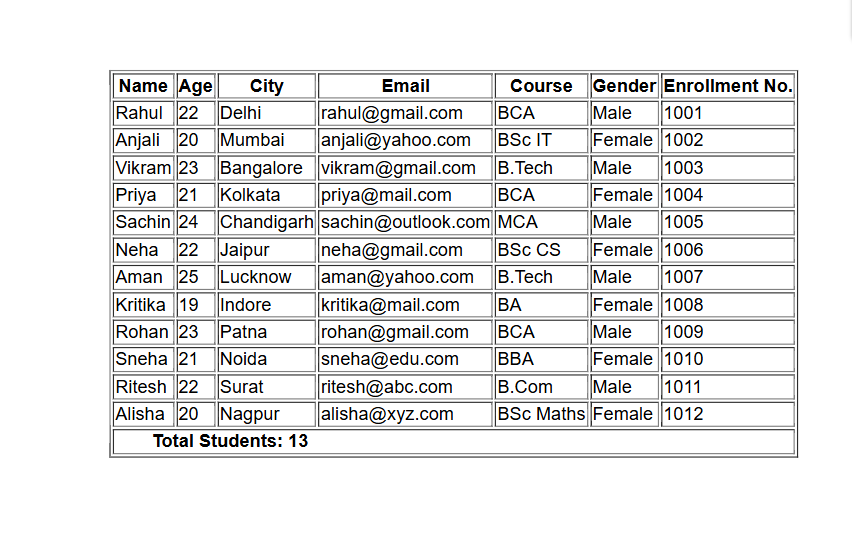
(This image here showing a table with a header row, multiple data rows, and a footer row indicating the total number of students.)
colspan feature
colspan is used to combine two or more columns into one column.
            <table border="1">
              <tr>
                <th colspan="2">Full Name</th>
              </tr>
              <tr>
                <th>First Name</th>
                <th>Last Name</th>
              </tr>
              <tr>
                <td>Rahul</td>
                <td>Sharma</td>
              </tr>
            </table>
Preview :
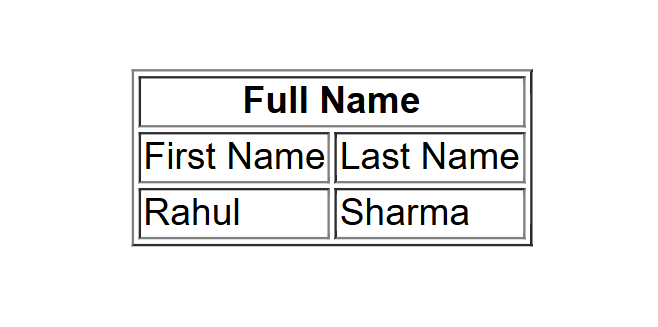
(This image here showing a table where the "Full Name" header spans across the "First Name" and "Last Name" columns.)
rowspan feature
rowspan is used to combine two or more rows into one row.
Example
            <table border="1">
              <tr>
                <th rowspan="2">Name</th>
                <th>Subject</th>
              </tr>
              <tr>
                <td>Math</td>
              </tr>
            </table>
Preview :
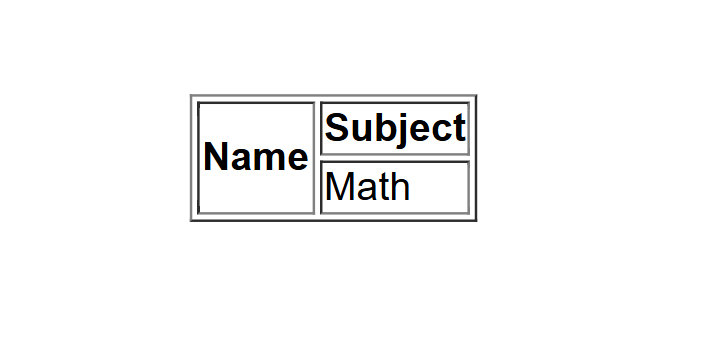
(This image here showing a table where the "Name" header spans across two rows, with "Subject" in the first row and "Math" in the second row.)
colspan & rowspan features
          <table border="1">
            <tr>
              <th rowspan="2">Student</th>
              <th colspan="2">Marks</th>
            </tr>
            <tr>
              <th>Math</th>
              <th>Science</th>
            </tr>
            <tr>
              <td>Anjali</td>
              <td>85</td>
              <td>90</td>
            </tr>
          </table>
Preview :
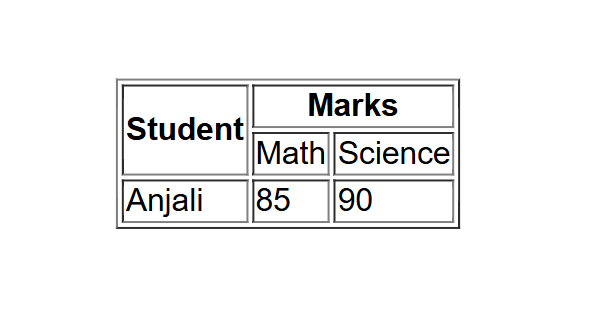
(This image here showing a table where "Student" spans two rows, and "Marks" spans two columns ("Math" and "Science").)
Summary
<thead>– Organizes heads.<tbody>– Contains main rows.<tfoot>– Adds table footer.colspan– Merges columns.rowspan– Merges rows.
These features make your tables more important and semantically correct, especially when you’re working with complex data.